


Virtual VDI/VDO
Virtual digital signal input terminal(VDI)#
set the DI function corresponding to VDI1 (virtual input terminal), please follow the steps below:
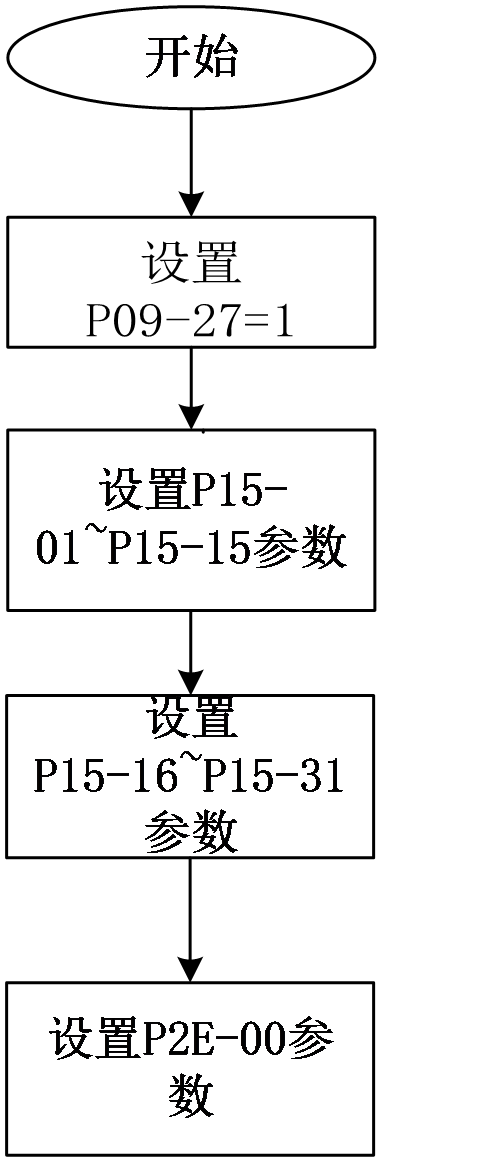
Figure 5.12 Virtual digital signal input terminal setting process
☆relevant code
Code | Name | Set range | unit | value | Effective Mode | Set mode | Relevant Mode |
P09-25 | Virtual VDI enable |
| - | 0 | Effective immediately | Stop set | Ordinary user |
P09-26 | VDI default value after power on | 0~65535 | - | 0 | Stop restart | Set anytime | Ordinary user |
P15-01~15 | VDI terminal function selection | 0~39 For details, please refer to the User Parameters section | - | 0 | Effective immediately | Set anytime | Ordinary user |
P15-16~31 | VDI terminal logic selection |
| - | 0 | Effective immediately | Stop set | Ordinary user |
P2E-00 | VDI virtual voltage level | 0~65535 | - | 0 | Effective immediately | Write anytime | Ordinary user |
The first time power on, the VDI terminal logic is determined by P09-26 (the default virtual level value of VDI after power on). Afterwards, the VDI terminal logic is determined by P2E-00 (VDI virtual level). The bit (n)=1 of P2E-00 indicates that the VDI (n+1) terminal logic is "1", and the bit (n)=0 indicates that the VDI (n+1) terminal logic is "0"。
Virtual Digital Signal Output Terminal (VDO)#
To set the DO function corresponding to VDO1 (virtual input terminal), please follow the steps below to use VDO:
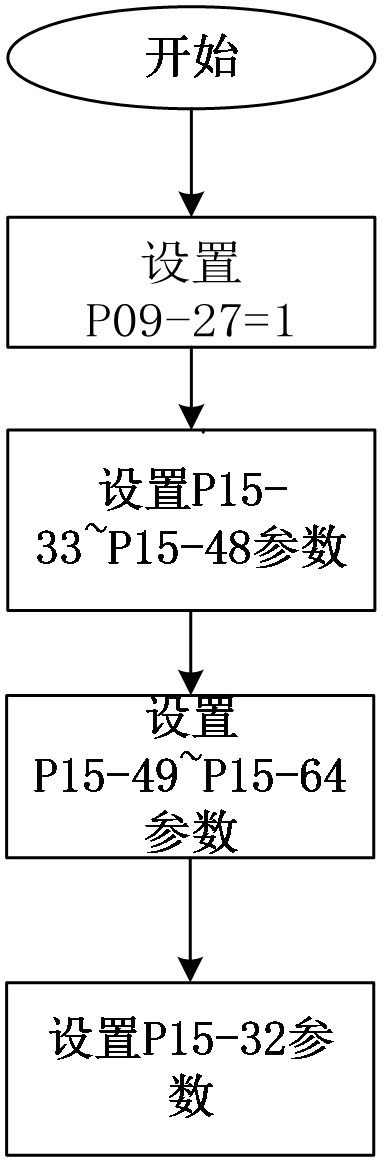
Figure 5.13 Virtual digital signal output terminal setting process
☆relevant code
Code | Name | Set range | unit | value | Effective Mode | Set mode | Relevant Mode |
P09-27 | Virtual VDO enable |
| - | 0 | Effective immediately | Stop set | Ordinary user |
P09-28 | VDO default value after power on | 0~65535 | - | 0 | Stop restart | Set anytime | Ordinary user |
P15-33~48 | VDO terminal function selection | 0~39 For details, please refer to the User Parameters section | - | 0 | Effective immediately | Set anytime | Ordinary user |
P15-49~64 | VDO terminal logic selection |
| - | 0 | Effective immediately | Stop set | Ordinary user |
P15-32 | VDO virtual level | 0~65535 | - | 0 | Effective immediately | Set anytime | Ordinary user |
The bit (n)=1 of P15-32 indicates that the logic of the VDO (n+1) terminal is "1", and the bit (n)=0 indicates that the logic of the VDO (n+1) terminal is "0".
อ่านเพิ่มเติม
- วัดค่า Inertia อัตโนมัติด้วย Inertia Identification (F00-03) | Samkoon Servoขั้นตอนการรัน Inertia Identification บน Samkoon R8 Servo Drive ผ่านปุ่มหน้าเครื่อง วัด Load Inertia Ratio จริงของเครื่องจักร ข้อควรระวังก่อนรัน การอ่านผล และการนำค่าไปใช้จูนระบบ
- เข้าใจ 3 Loop ของ Servo Drive | Position, Speed, Current Loopอธิบายการทำงานของ Position Loop, Speed Loop และ Current Loop ใน Servo Drive กฎการจูนทั้ง 3 วงจร โหมดควบคุมทั้ง 3 แบบ (Position / Speed / Torque) และการเลือกโหมดให้ตรงกับงาน
