


1. COM port communication parameter settings
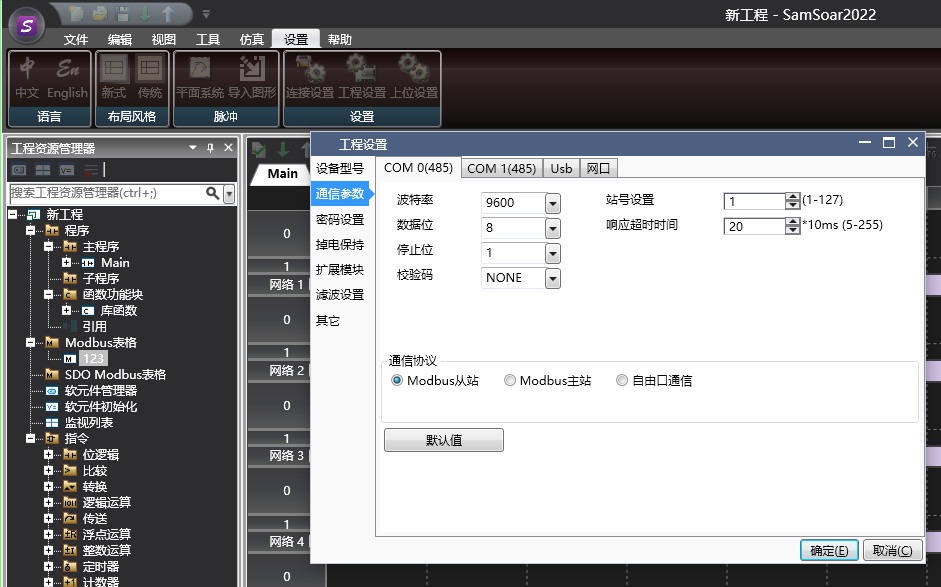
图1 Communication Parameter Settings
COM port parameter settings: On this page, corresponding settings can be made for the communication parameters of the PLC. The default communication parameters for PLC serial port are: baud rate 9600, data bit 8, stop bit 1, and check code NONE;
Serial communication protocol types: including Modbus master, Modbus slave, and free port communication. The default protocol is Modbus slave;
Station number: Set the station number of the PLC, and different COM ports can have different station numbers;
Timeout: This parameter only takes effect during Modbus master communication and has no practical significance for slave and free port communication. It represents the maximum waiting time for the PLC to receive one packet of data from the slave each time it communicates as the master, with a default value of 20 * 10ms;
Number of retransmissions: This parameter only takes effect during Modbus master communication and has no practical significance for slave and free port communication. It represents the number of retransmissions that will occur again when receiving data from the slave after timeout, with a default value of 3;
Buffer bit: This parameter only takes effect during free port communication and has no practical significance for Modbus master and slave stations. It indicates whether data is buffered in 8-bit or 16 bit format during communication;
Attention:
If you want to use MODBUS master communication, you must select the Modbus master protocol, establish and edit a Modbus master table, and use Modbus commands in the ladder diagram;
When the communication protocol of the COM port is set to MODBUS master or free port communication, it can no longer be used to download projects, nor can it be monitored. Only when the Modbus slave protocol is selected and downloaded to the PLC can it have download and monitoring functions;
In addition to downloading and updating serial port information through configuration information, settings for serial port baud rate, data bits, stop bits, checksum, station number, etc. can also be set through special registers D8066~D8075, M8184;
อ่านเพิ่มเติม
- สอนใช้ Modbus RS485 Master-Slaveคู่มือสอนการใช้งาน Modbus RS485 สำหรับ Samkoon PLC แบบ Master-Slave การเชื่อมต่อ PLC หลายตัว ตั้งค่า Communication Port และการสร้าง Modbus Table
- วิธีใช้ Modbus Poll กับ PLC FAs - การเชื่อมต่อและอ่านข้อมูลเรียนรู้การใช้งาน Modbus Poll กับ PLC FAs แบบละเอียด ตั้งแต่การเชื่อมต่อ TCP/IP การอ่าน Address Map การแก้ไข Illegal Data Address Error และเทคนิคการทดสอบ
- วิธีแก้ปัญหาการสื่อสาร Modbus บน PLC | ตรวจสอบสถานะเชื่อมต่อเรียนรู้วิธีแก้ปัญหาการสื่อสาร Modbus บน PLC ด้วย Status Code การตั้งค่าระบบแจ้งเตือน และเทคนิคแก้ไขปัญหาการเชื่อมต่อขาดหายในระบบอัตโนมัติ
- Modbus RTU Simulatorจำลอง Master/Slave ในเบราว์เซอร์ หรือต่อ PLC จริงผ่าน USB-RS485 · ≥ 1024 px

