1. CRC Check CRCCHECK
1.1. Instruction Description#
Addr (starting address): Store the data when calculate the CRC check code in an area starting from Dn, and this operand can only be selected from the D data register;
Len (data length): In bytes, one D register occupies 2 bytes, with the lower bits before the higher bits.
Mode (CRC Check Mode): Different types of CRC checks can be selected.
Res (result): As the output result, if the verification passes, the output is ON, and if it does not pass, the output is OFF.
| Name | Number | Polynomial | Check Code Length |
|---|---|---|---|
| CRC-16 | K0 | X16+X15+X2+1 | 2 bytes |
| CRC-12 | K1 | X12+X11+X3+X2+X+1 | 2 bytes |
| CRC-8 | K2 | X8+X2+X+1 | 1 byte |
| CRC-CCITT | K3 | X16+X12+X5+1 | 2 bytes |
| CRC-32 | K4 | X32+X26+X23+X22+X16+X12+X11+X10+X8+X7+X5+X4+X2+X+1 | 4 bytes |
| CRC-32C | K5 | X32+X28+X27+X26+X25+X23+X22+X20+X19+X18+X14+X13+X11+X10+X9+X8+X6+1 | 4 bytes |
1.2. The valid operands of the instruction#
| Input/Output | Data Type | operand | Description |
|---|
1.3. Example#
Instruction table:
NETWORK 000
LD M0
MOV H3412 D0
MOV H7856 D1
MOV H107B D2
CRCCHECK D0 K6 K0 M1
POP
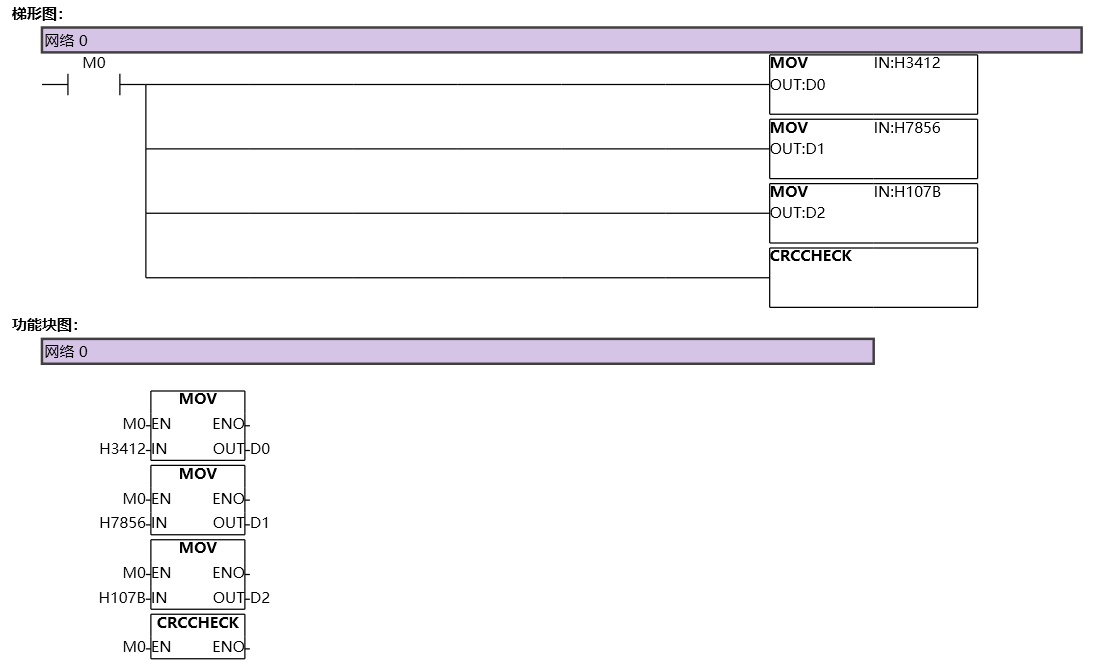
图1 CRCCHECK
อ่านเพิ่มเติม
- สอนใช้ Modbus RS485 Master-Slaveสอนใช้ Modbus RS485 กับ Samkoon PLC 3 ตัวแบบ Master-Slave ต่อสาย 485A/485B แบบ Multi-Drop ตั้งค่า COM1(485) ใน Project Setting สร้าง Modbus Table อ่าน/เขียน และเรียกด้วยคำสั่ง MBUS ใน SamSoar2022
- วิธีใช้ Modbus Poll กับ PLC FAs - การเชื่อมต่อและอ่านข้อมูลต่อโปรแกรม Modbus Poll กับ PLC Samkoon FAs ผ่าน Modbus TCP/IP (IP 192.168.1.200 Port 2000) แล้วอ่านเขียน Output Y ตามตารางตำแหน่งข้อมูล Modbus ของ Samkoon พร้อมสาเหตุที่ขึ้น Illegal Data Address
- วิธีแก้ปัญหาการสื่อสาร Modbus บน PLC | ตรวจสอบสถานะเชื่อมต่อเช็คว่าการสื่อสาร Modbus ของ PLC Samkoon หลุดหรือไม่ จาก Code ในคำสั่ง MBUSTCP/MBUS — Code 16 คือสื่อสารหลุด (Timeout) แล้วใช้เงื่อนไขเปรียบเทียบสั่ง Output แจ้ง Alarm
- Modbus RTU Simulatorจำลอง Master/Slave ในเบราว์เซอร์ หรือต่อ PLC จริงผ่าน USB-RS485 · ≥ 1024 px
อุปกรณ์ที่ใช้กับคู่มือนี้
2 รายการ