


1. TCP send TCP_SEND
ในหน้านี้4 หัวข้อ
1.1. Instruction description#
Free port data sending instruction, which can be used for the data sending function of the free port after successful connection using TCPVNet.
1.2. Instruction parameters#
1. Socket: Set the number of the connection established between the local IP and the remote IP, ranging from K0 (seckcot0) to K5 (seckcot5)
2. Data: The parameter address is an area starting from Dn, and this operand can only select the D data register;
3. Length: Set the length of the data to be sent. This operand can be selected as K/H/D and can send up to 1460Byte of data
4. Completion bit: After completing a data transmission, set this register to 1. Reset this register at the beginning of the second transmission, and pass NULL to not retrieve the status
5. Error bit: When an error occurs using this instruction, set this register to 1 and pass NULL to retrieve the status
6. Error Code: Returns error code values for different errors, as shown in the table below, which can be passed in as NULL but not retrieved
| Error code | Error description |
|---|---|
| 0x00 | No errors |
| 0x01 | Sending failed |
1.3. The valid operands of the instruction#
| Input/Output | Data Type | operand | Description |
|---|---|---|---|
| SOCKET | 16 bit unsigned integer | K/H | Socket |
| DATA | 16 bit unsigned integer | D | Data |
| LEN | 16 bit unsigned integer | D/CV/TV/AI/AO/K/H/V/Z/FD, bit composite word (X/Y/M/C/T/S), local variable (LW) | length |
| DONE | ON/OFF | M/NULL | Finish bit |
| E | ON/OFF | M/NULL | Error bit |
| C | 16 bit unsigned integer | D/NULL | Error code |
1.4. Example#
As shown in the ladder diagram below, before using TCP_SND, it is necessary to first use the TCP-INNECT command to establish a connection. The TCP-INNECT command follows the parameters described earlier to establish a client (active connection). The socket is K0, and this function sends 100 bytes of data to the remote server every 100ms (M8159 is a 100ms cycle register) after the connection is successfully established (M1000 register is the connection completion bit).
Command table:
NETWORK 000
LD M0
MPS
MEP
MOV K192 D5000
MOV K168 D5001
MOV K1 D5002
MOV K11 D5003
MPP
TCP_CONNECT K0 D5000 K2000 K0 K65535 M1000 M1001 D5006
POP
LD M1000
ANDP M8159
TCP_SEND K0 D1000 K100 M1002 M1003 D5007
POP
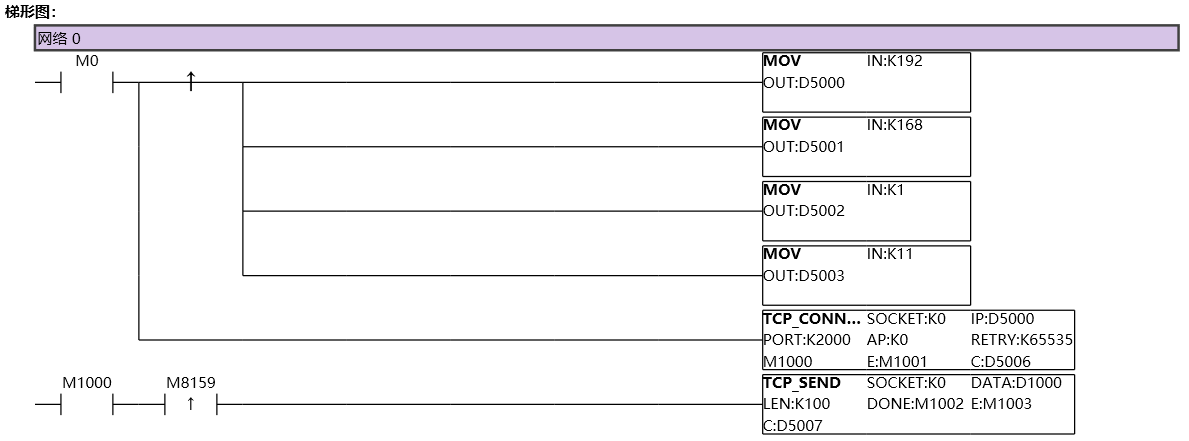
图1 TCPSEND1
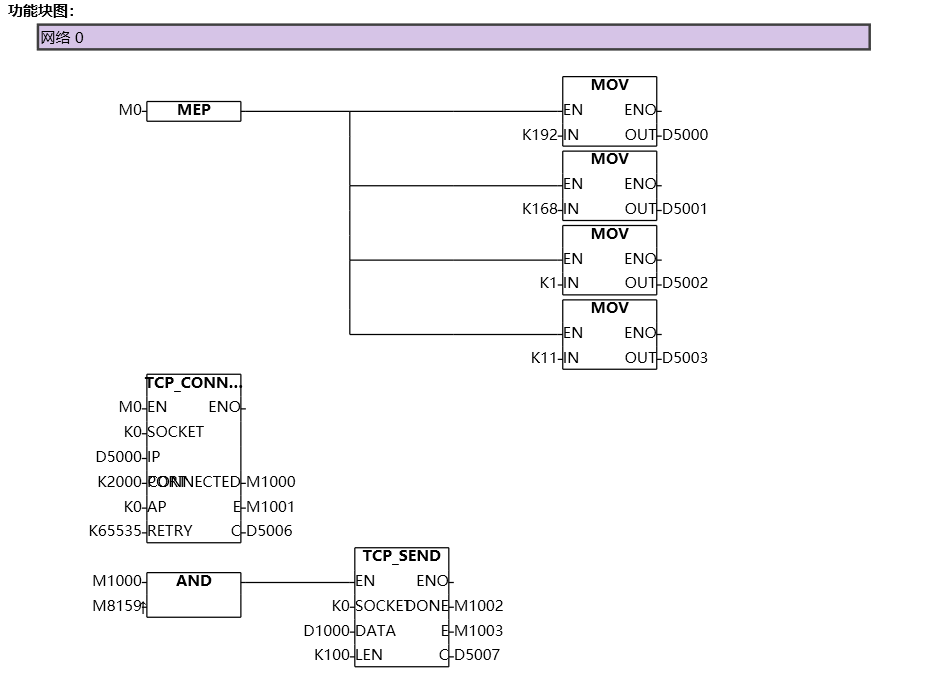
图2 TCPSEND2
อ่านเพิ่มเติม
- สอนใช้ Modbus RS485 Master-Slaveคู่มือสอนการใช้งาน Modbus RS485 สำหรับ Samkoon PLC แบบ Master-Slave การเชื่อมต่อ PLC หลายตัว ตั้งค่า Communication Port และการสร้าง Modbus Table
- วิธีใช้ Modbus Poll กับ PLC FAs - การเชื่อมต่อและอ่านข้อมูลเรียนรู้การใช้งาน Modbus Poll กับ PLC FAs แบบละเอียด ตั้งแต่การเชื่อมต่อ TCP/IP การอ่าน Address Map การแก้ไข Illegal Data Address Error และเทคนิคการทดสอบ
- วิธีแก้ปัญหาการสื่อสาร Modbus บน PLC | ตรวจสอบสถานะเชื่อมต่อเรียนรู้วิธีแก้ปัญหาการสื่อสาร Modbus บน PLC ด้วย Status Code การตั้งค่าระบบแจ้งเตือน และเทคนิคแก้ไขปัญหาการเชื่อมต่อขาดหายในระบบอัตโนมัติ
- Modbus RTU Simulatorจำลอง Master/Slave ในเบราว์เซอร์ หรือต่อ PLC จริงผ่าน USB-RS485 · ≥ 1024 px

