


1. TCP connection TCP-CONNECT
ในหน้านี้4 หัวข้อ
1.1. Instruction Description#
This instruction is used for free port communication to establish a connection between the local IP of the PLC and the remote IP. Through this instruction, the free port can be set to be used by the client or server (by setting the active and passive connection parameters). Only after a successful connection is established can Ethernet communication be carried out. At present, a maximum of one socket connection can be established, which means that when a free port is used as a client, it only supports establishing a connection with one Ethernet server. As a server, it only supports listening for one client connection.
Before using the TCP-SEND/TCP-RECV command to communicate with an external server via Ethernet, it is necessary to first establish a connection with the external server using the TCP-CONNECT command.
1.2. Instruction parameters#
1. Socket: Set the number of the connection established between the local IP and the remote IP, ranging from K0 (seckcot0) to K5 (seckcot5)
2. IP Address: Set the remote IP first address, with parameter format referencing the example. When used as a client, this IP address is the address of the server to be accessed, and when used as a server, this IP address is the remote client address
3. Port number: When used as a client, this port is the target port number to be accessed, and when used as a server, this port number is the listening port number of the server
4. Active Passive Connection: The free port can be set as either a server or a client. Choosing Active Connection (K0) will allow the free port to access the server as a client; Choosing passive connection (K1) will act as a server to listen for client connections
5. Reconnection times: Set the number of connections between the local IP and the remote IP. The input parameters represent K0: no reconnection, K1~K65534: reconnection range, K65535: continuous reconnection, and the reconnection time interval is set to the "connection timeout" parameter in the main station parameter settings
6. Completion bit: When used as an active connection, this bit is set to 1 after successfully connecting to the server. When used as a passive connection, this bit is set to 1 after being successfully connected by the client. When not connected, it is set to 0. NULL can be passed in and the connection status is not obtained.
7. Error bit: When an error occurs during instruction usage, it is set and can be passed as NULL
8. Error code: The numerical meaning of the error code is shown in the table below and can be passed in as NULL
| Error code | Error description |
|---|---|
| 0x00 | TCP connection error free |
| 0x01 | TCP connection timeout |
| 0x02 | TCP connection failed (fault) |
| 0x03 | Number of connections exceeded limit |
| 0x04 | Free port function not enabled |
Attention:
To establish a connection between PLC and external server devices, they need to be in the same local area network, with the same IP address and network number;
After enabling the command, if the enabling condition is disconnected, the previously established connection will be disconnected. Modify IP parameters, re enable, and establish a new connection;
When setting the reconnection parameter using TCP-CONNECT, if K0 is set to not reconnect, it will default to connecting once and will no longer attempt to connect after timeout; If set within the range of K1~K65534 reconnection times, when the cumulative number of connection timeouts exceeds the set reconnection times, the connection will no longer continue. Both settings need to be disconnected and the DESIIP command enabled again before reconnecting. Please be careful when using! If K65535 is set to always reconnect, it will automatically reconnect after the connection timeout. Please choose a reasonable setting according to the scenario requirements. If there are no special applications, it is recommended to use K65535 to always reconnect.
When used as an active connection, the 'number of reconnections' parameter is valid. When used as a passive connection (server), this parameter is invalid. When the command enables the server to start, it will wait for listening until a client connection is made. When disabled, the command can stop listening and waiting.
When used as a passive connection (server), the IP address at this time is the specified remote IP that can support connections, and other remote IP connections will be prohibited. To enable the server to support any IP connection, a NULL parameter is passed in. It should be noted that when used as an active connection, IP addresses are not supported!
It is recommended to set the port of the free port to 1024 or above, and the port setting cannot be the same as the "slave port" and download monitoring port number (2022) of the Modbus TCP/IP slave protocol!
1.3. The valid operands of the instruction#
| Input/Output | Data Type | operand | Description |
|---|---|---|---|
| SOCKET | 16 bit unsigned integer | K/H | Socket |
| IP | 16 bit unsigned integer | D/NULL | IP address |
| PORT | 16 bit unsigned integer | K/H | Port |
| AP | 16 bit unsigned integer | K/H | Active passive connection |
| RETRY | 16 bit unsigned integer | D/CV/TV/AI/AO/K/H/V/Z/FD, bit composite word (X/Y/M/C/T/S), local variable (LW) | number of reconnections |
| CONNECTED | ON/OFF | M/NULL | Finish Bit |
| E | ON/OFF | M/NULL | Error bit |
| C | 16 bit unsigned integer | D/NULL | Error code |
1.4. Example#
As shown in the figure below, the socket is K0, D5000 is the first address of the instruction IP, and the remote server IP parameter is 192.168.1.200. Assign this parameter to D5000~D5003, set the port number to 2000, and set it to actively connect to K0 (client). The number of reconnections is continuous (K65535), and the completion and error bits are M1000 and M1001, respectively, to indicate the connection status. The error code is D5006. After connecting M0, a connection can be established to access the specified server.
command table:
NETWORK 000
LD M0
MPS
MEP
MOV K192 D5000
MOV K168 D5001
MOV K1 D5002
MOV K11 D5003
MPP
TCP-CONNECT K0 D5000 K2000 K0 K65535 M1000 M1001 D5006
POP
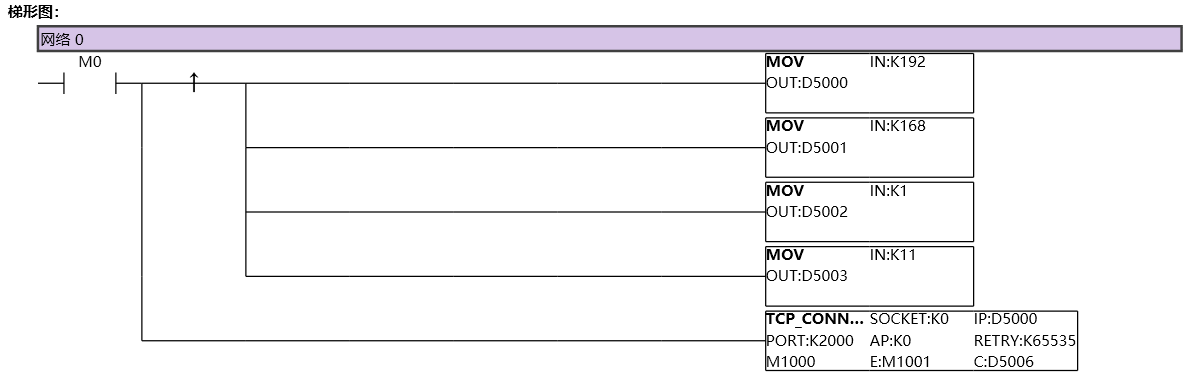
图1 TCPCONNECT1
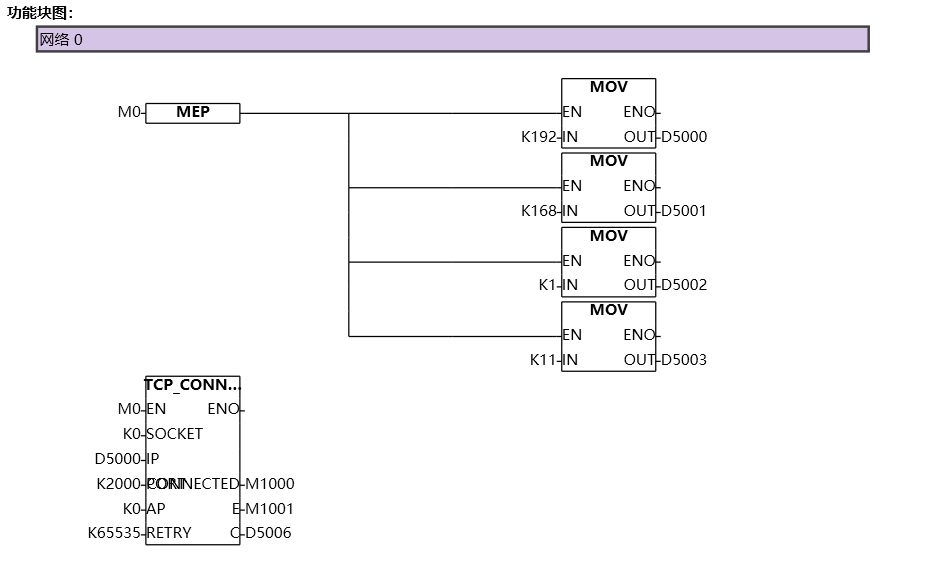
图2 TCPCONNECT2
อ่านเพิ่มเติม
- สอนใช้ Modbus RS485 Master-Slaveคู่มือสอนการใช้งาน Modbus RS485 สำหรับ Samkoon PLC แบบ Master-Slave การเชื่อมต่อ PLC หลายตัว ตั้งค่า Communication Port และการสร้าง Modbus Table
- วิธีใช้ Modbus Poll กับ PLC FAs - การเชื่อมต่อและอ่านข้อมูลเรียนรู้การใช้งาน Modbus Poll กับ PLC FAs แบบละเอียด ตั้งแต่การเชื่อมต่อ TCP/IP การอ่าน Address Map การแก้ไข Illegal Data Address Error และเทคนิคการทดสอบ
- วิธีแก้ปัญหาการสื่อสาร Modbus บน PLC | ตรวจสอบสถานะเชื่อมต่อเรียนรู้วิธีแก้ปัญหาการสื่อสาร Modbus บน PLC ด้วย Status Code การตั้งค่าระบบแจ้งเตือน และเทคนิคแก้ไขปัญหาการเชื่อมต่อขาดหายในระบบอัตโนมัติ
- Modbus RTU Simulatorจำลอง Master/Slave ในเบราว์เซอร์ หรือต่อ PLC จริงผ่าน USB-RS485 · ≥ 1024 px

