


1. PLC with Ethernet port usage
ในหน้านี้18 หัวข้อ
- 1.1. Parameter settings before using the network port
- 1.2. Monitoring and downloading:
- 1.3. The use of the slave station function (enabled by default)
- 1.4. The use of slave station functions
- 1.4.1. Parameter settings
- 1.5. Master station usage:
- 1.5.1. target IPDESTIP command description:
- 1.5.2. MobusTCP command:
- 1.6. Free port communication function usage
- 1.6.1. 5-1 Parameter set
- 1.7. Attention:
- 1.8. Free port command usage:
- 1.8.1. TCP_CONNECT command description:
- 1.8.2. TCP_SEND command description:
- 1.8.3. TCP_RECV command description:
- 1.9. Network port parameter system register
- 1.9.1. System register address
- 1.9.2. IP parameter modification method
1.1. Parameter settings before using the network port#
Open the project settings, select communication parameters, and choose the network port. Before use, set the network port parameters and communication protocol, such as the IP address, subnet mask, and gateway of the network port. The download monitoring port (2022) and monitoring station number (1) are fixed values; The communication protocol can be selected as Modbus TCP/IP slave, Modbus TCP/IP master, and free port communication. After enabling, the communication parameters corresponding to the protocol can be set.
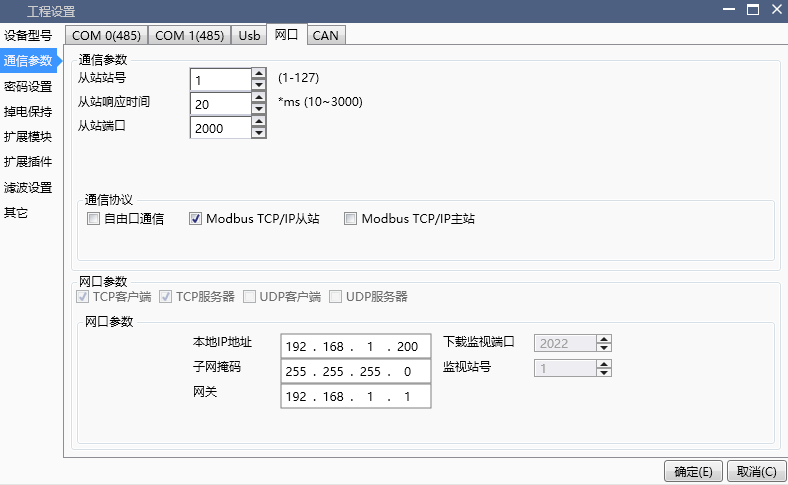
图1 Ethernet Port Setting 1
1.2. Monitoring and downloading:#
As shown in the following figure, by selecting the download port, you can use the network port to download and monitor functions
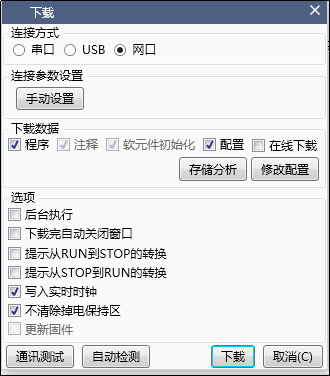
图2 Ethernet Set 2.1
Click on 'Manual Settings' in the connection parameter settings to set the destination IP address and timeout period to be connected. The destination port and monitoring station number are fixed and cannot be changed. After setting, click on' Communication Test Verification
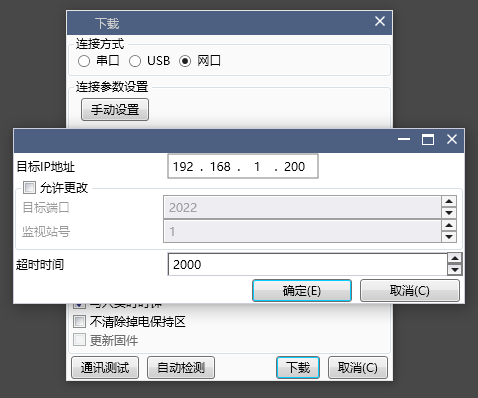
图3 Ethernet set 2.2
Attention:
 >(1)Downloading through the internet port cannot achieve firmware updates, nor can it restore factory settings!
(2)Use the PLC's network port to monitor the default fixed port (2022) and monitoring station number (1). This download monitoring port only supports one monitoring connection.
(3)If you want to use the software for multiple monitoring (opening multiple projects), please use the slave port (such as 2000) and the slave station number, which can be checked for this special purpose click" ✔ Allow changes "so that able modify the target port and monitoring station number .It should be noted that using multiple monitors will occupy the number of connections from the slave station. Please use it reasonably according to the scenario (Modbus TCP/IP slave function must be enabled).
1.3. The use of the slave station function (enabled by default)#
In the communication parameter network port section of the project settings, select to enable the Moudbus TCP/IP slave protocol on the communication protocol to use the slave function (the slave function includes our PLC protocol by default). The slave protocol can support up to 6 client master station connections, and the communication parameters of the slave protocol include
(1)Slave Station Number Setting: The station number used as the server's slave station
(2)Response time: The time it takes for the slave station to respond to the master station, ranging from 10ms to 3000ms, with a default of 20ms
(3)Slave port: The communication port number of the slave, default 2000
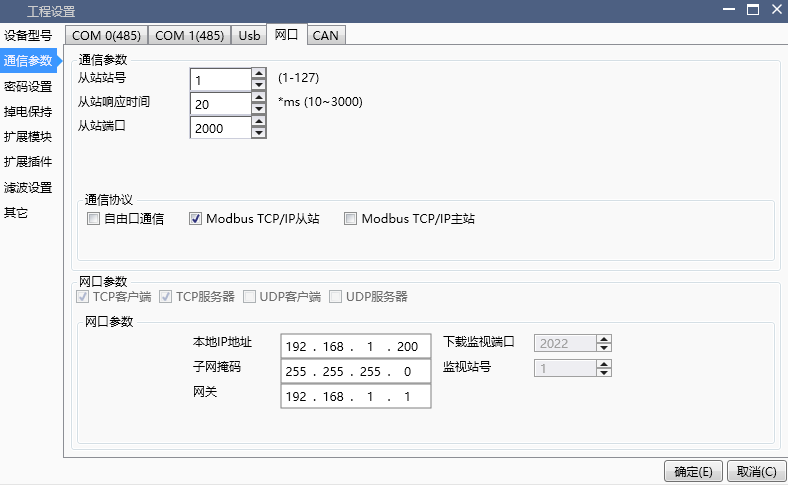
图4 Ethernet set 3
1.4. The use of slave station functions#
1.4.1. Parameter settings#
In the communication parameter network port section of the project settings, select to enable the Moudbus TCP/IP master station protocol on the communication protocol to use the master station function. When using the master station protocol, the network port acts as a client to access the server. The communication parameters of the master station include
(1)Times of retransmissions: The number of retransmissions in case of communication timeout/failure, with a default of 3 times
(2)Response timeout: timeout setting during communication, range: 50ms~2500ms
(3)Moudbus frame interval: data frame transmission interval, range: 1ms~500ms
(4)Connection timeout: The timeout period for connecting to the target IP using the command (DESTIP), set within the range of 100ms~3000ms, with a default of 3000ms.
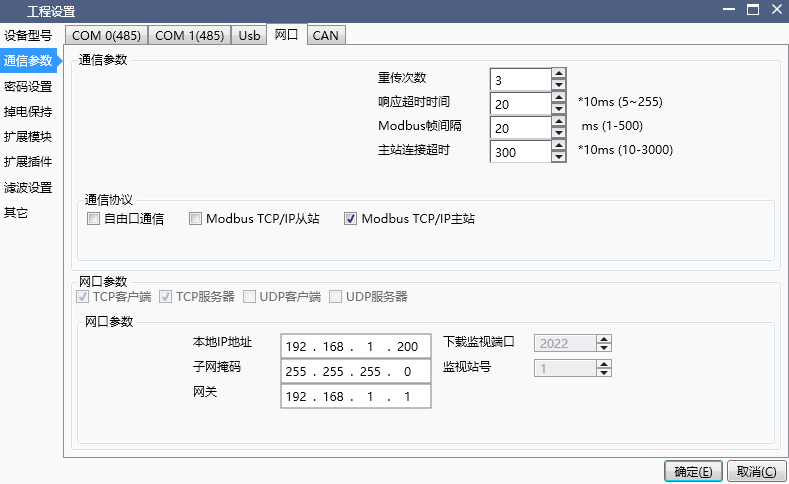
图5 Ethernet set 4
1.5. Master station usage:#
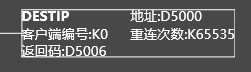
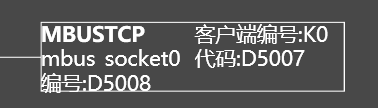
1.6. Free port communication function usage#
1.6.1. 5-1 Parameter set#
To use the free port function of the network port, it is necessary to enable the free port communication function in the communication protocol selection. The parameters of the free port protocol are:
(1)Buffer bit: Definition of the number of data bits received by the free port, available in 8-bit and 16 bit options. 8-bit: During communication, the high 8-bit byte of the D register is invalid, and the PLC only uses the low 8-bit byte of the D register to send and receive data; 16 bits: During communication, the PLC first sends the low 8-bit byte data in the D register, and then sends the high 8-bit byte data;
(2)Connection timeout: Use the command TCPFHIR NECT to set the timeout for connecting the free port as a client to the target IP. The setting range is 100ms~3000ms, with a default of 3000ms
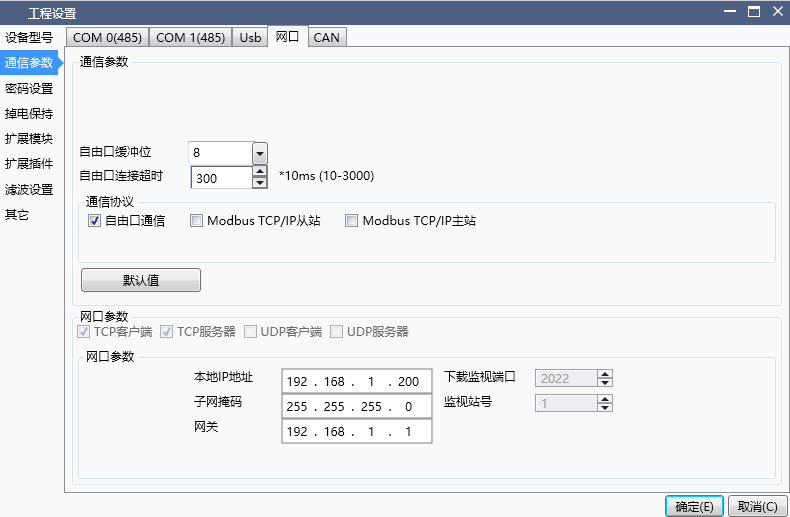
图8 Ethernet set 5.1
1.7. Attention:#
(1)Free port communication only supports 1 socket connection! After enabling free port communication, the slave connection only supports 5 connections.
(2)Regardless of whether 8-bit or 16 bit data buffer bits are selected, the transmission length Len of the free port buffer bits is byte length. When 8-bit is selected, a D register is one byte length, while when 16 bit is selected, a D register is two bytes length;
1.8. Free port command usage:#
1.8.1. TCP_CONNECT command description:#
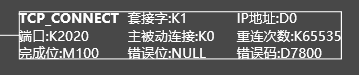
1.8.2. TCP_SEND command description:#

1.8.3. TCP_RECV command description:#
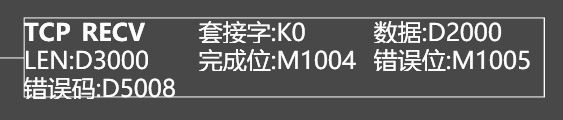
1.9. Network port parameter system register#
1.9.1. System register address#
| Register address | Data type | Function |
|---|---|---|
| M8045 | BOOL | Enable bit for network port parameter change to take effect |
| D8050~D8053 | WORLD | IP address, with 4 registers corresponding to 4 bytes of the local 32-bit IP address. If using a C-class address, D8050~D8052 are network numbers and D8053 is the host number |
| D8054~D8057 | WORLD | Subnet mask, a 32-bit binary number used in conjunction with a 32-bit IP address for logical operations to determine network and host identification. The 1 in the subnet mask indicates that the corresponding bit in the IP address is the network part, and 0 is the host part. For example, when using a C-class address for an IP address, D8054~D8056 are all 255, and D8057 is 0 |
| D8058~D8061 | WORLD | Gateway, 4 registers correspond to 4 bytes of the 32-bit gateway IP address of the gateway. If using a C-class address, D8058~D8060 is the network number and D8061 is the host number |
1.9.2. IP parameter modification method#
For example, using commonly used C-class addresses, the current network port parameters are as follows:
| Definition | Specific Parameters |
|---|---|
| IP address | 192.168.1.200 |
| Subnet Mask | 255.255.255.0 |
| Gateway | 192.168.1.1 |
Based on the above network port parameters, read and obtain PLC register D8050=192 at this time, D8051=168,D8052=1,D8053=200。 Other register values are similar. If you want to change the IP address to 192.168.1.100 at this time, there are the following steps:
(1)Modify D8053 to 100.
(2)Set the network port parameter activation enable bit M8045 to 1 (default is 0),
(3)Power off and restart the PLC to make the modification of network port parameters effective
The above modifications are simple operations for maintaining IP addresses within the same network segment, and the same applies to modifying other parameters.
Attention:
M8045 must be set to 1, otherwise the setting will not take effect, and the network port parameters of the PLC will continue to operate using the previously set network port parameters after power failure and restart.
The valid range for the numerical input of each register is 0-254. If the value exceeds this range, it cannot be written or changed, and the value of the register will remain unchanged.
The set IP address should be in the same network segment as the gateway, that is, the network number of the IP address should be the same as the network number of the gateway.
อ่านเพิ่มเติม
- สอนใช้ Modbus RS485 Master-Slaveคู่มือสอนการใช้งาน Modbus RS485 สำหรับ Samkoon PLC แบบ Master-Slave การเชื่อมต่อ PLC หลายตัว ตั้งค่า Communication Port และการสร้าง Modbus Table
- วิธีใช้ Modbus Poll กับ PLC FAs - การเชื่อมต่อและอ่านข้อมูลเรียนรู้การใช้งาน Modbus Poll กับ PLC FAs แบบละเอียด ตั้งแต่การเชื่อมต่อ TCP/IP การอ่าน Address Map การแก้ไข Illegal Data Address Error และเทคนิคการทดสอบ
- วิธีแก้ปัญหาการสื่อสาร Modbus บน PLC | ตรวจสอบสถานะเชื่อมต่อเรียนรู้วิธีแก้ปัญหาการสื่อสาร Modbus บน PLC ด้วย Status Code การตั้งค่าระบบแจ้งเตือน และเทคนิคแก้ไขปัญหาการเชื่อมต่อขาดหายในระบบอัตโนมัติ
- Modbus RTU Simulatorจำลอง Master/Slave ในเบราว์เซอร์ หรือต่อ PLC จริงผ่าน USB-RS485 · ≥ 1024 px

