


1. Real time frequency modulation and real-time positioning commands EDRVI/EDRVA
ในหน้านี้7 หัวข้อ
1.1. Instruction description#
Real time frequency modulation and real-time relative/absolute positioning pulse output EDRVI/EDRVA are pulse output instructions with acceleration and deceleration that can be used to achieve specified pulse frequency and number of pulses. When the input terminal is turned on, the pulse accelerates uniformly to the set frequency and outputs at a constant speed. When decelerating, it decelerates from the set frequency to 0, and the specified number of pulses is sent during the process. When the pulse command enable condition is disconnected, the pulse output immediately stops. During the pulse transmission process or after the end of the pulse transmission but without disconnecting the front enable, the pulse frequency and number can be modified in real time. The process of frequency adjustment and pulse number adjustment both have acceleration and deceleration processes.
The EDRVI/EDRVA command can output frequencies ranging from 0Hz to 200KHz and pulse quantities ranging from K0 to K2147483647.
For 16 point transistor type PLCs, Y0~Y1 are high-speed pulse output ports, and for 32/50/66 point transistor type PLCs, Y0~Y3 are high-speed pulse output ports; Relay type PLCs do not have high-speed pulse function, and the maximum output frequency of the output port is determined by the closing time of the relay. For multi pulse series PLCs, their high-speed pulse output ports are Y0~Y7 and Y10~Y11.
The instruction can be used for asymmetric (acceleration/deceleration time set separately) trapezoidal and S-shaped position control. When the special function register M8069 is ON, the acceleration/deceleration of all pulse instructions is S-shaped, and when it is OFF, it is trapezoidal.
The special function register M8068 is used for global directional polarity control. The default pulse direction output port is ON, which indicates the positive direction, and OFF, which indicates the negative direction. If M8068 is set to ON, the polarity of the directional output of all pulse commands will be reversed, with OFF indicating positive direction and ON indicating negative direction. In addition, M8192~M8201 represent the pulse direction polarity of Y0~Y7 and Y10~Y11 axes respectively, and the polarity of each axis direction can be adjusted separately. When the global directional polarity M8068 is ON, the directional polarity settings of each axis are ignored.
1.2. Instructions for use#
1) As shown in Figure 1, first set the parameters such as frequency, number of pulses, acceleration and deceleration time, and then turn on M0. Y0 will start sending pulses according to the set parameters. If the values of frequency and pulse number are not changed at this time, the instruction will run exactly the same as DRVI. If the value of frequency D0 (D1) is changed during the pulse transmission process, the frequency curve will be recalculated immediately based on the number of pulses after detecting the change in D0 (D1) during the scanning cycle operation. If the number of pulses D2 (D3) is changed during the pulse transmission process, and the scanning cycle detects the change, the frequency curve will be immediately recalculated based on the position of the newly changed number of pulses. The change in the number of pulses may cause the motor to reverse, which will be explained in detail later. In addition, if the pulse transmission is completed and M0 is not enabled, changing the value of pulse number D2 (D3) will immediately move the motor to the newly changed position. The modification of acceleration and deceleration time is invalid.

图1 EDRVI command example
2) As shown in Figure 2, the real-time adjustment curve of EDRVI frequency starts sending pulses at time t0, and after an acceleration time (t1 \ - t0), the frequency reaches the set frequency F1. Without modifying the frequency, the curve continues to run along the dashed line until the pulse transmission is completed and ends at time t6. If the frequency is changed to F2 in real-time at time t2, the frequency will shift from F1 to F2 with a set acceleration time of (t3 \ - t2), and continue to run along F2 until the pulse transmission is completed or the next frequency change is made. The number of pulses sent from t2 to t5 after speed regulation is the same as the number of pulses sent from t2 to t6 in the dashed line, indicating that speed regulation does not affect the final target number of pulses.
As shown in Figure 3, if the current frequency has not reached a stable frequency or is in a deceleration phase, the curve will be adjusted with the current pulse frequency as the starting frequency, F2 as the target frequency, and the remaining number of transmitted pulses as the total number of pulses. Figure 2 shows the situation where the modified frequency F2 can be reached, while there are usually situations where F2 cannot be reached due to too few remaining pulses. At this time, the PLC will automatically adjust the shape of the curve and run.
When only speed adjustment is required and running continuously in one direction, when the pulse number is set to 0x7FFFFFFF, the pulse is continuously sent in the positive direction, and when the pulse is set to 0x80000000, the pulse is continuously sent in the negative direction (only EDRVI is valid, EDRVA does not have continuous sending function). If set to continuously send pulses, changing the number of pulses after the first conduction command is invalid.
When the frequency is changed to 0 during operation, it means that the pulse transmission is paused, and the frequency curve will immediately decelerate from the current frequency to stop. When the frequency is changed to a new value, the frequency curve will accelerate from zero to the new frequency and continue to complete pulse transmission.

图2 Frequency Adjustment Curve

图3 Acceleration and Deceleration Stage Frequency Adjustment Diagram
3) Real time position adjustment has multiple uses. As shown in Figure 4, when the command is turned on, the worktable moves from a stationary position at P0 to the P1 position, and the pulse transmission is completed at this time. Without turning on the enable condition in front of the command, if the target position is changed to P2, the command will immediately send a pulse, moving from P1 to P2. When P2 is on the left side of P1, it will also run in reverse, and so on. When it is in a static state, it can be adjusted to other positions again. This adjustment method is to adjust the position under static state. At this point, it is important to pay attention to the difference between the relative command EDRVI and the absolute command EDRVA. Assuming that P0, P1, and P2 in Figure 4 are positions in the absolute coordinate system, when using the EDRVI relative command, since the starting position is at P0, the number of pulses from P0 to P1 needs to be set to (P1 \ - P0). Note that if you want to move from P1 to P2, the number of pulses needs to be set to (P2 \ - P0), and all subsequent adjustments are based on the relative position of P0. When using the EDRVA absolute command, when moving from P0 to P1, the number of pulses is set to P1, and when moving from P1 to P2, the number of pulses is set to P2. The subsequent adjustments are based on the position of the coordinate origin.

图4 Position adjustment
4) As shown in Figure 4, when dynamically adjusting the position, that is, during the process of P0 moving to P1, the target position is modified to P2. There are various situations at this time, and the corresponding operating modes are also different. As shown in Figure 5, without modifying the target position, it moves from time t0 (P0 position) to time t3 (P1 position). If at time t2, the target position is changed to P2 position without changing the frequency, it will run directly to P2 position, ignoring the original P1 position setting.

图5 Dynamic position adjustment
5) As shown in Figures 6 and 7, if during the process of moving from P0 to P1, the current position at time t2 is P1.5, and the target position modified at time t2 is P2, but P2 is on the left side of P1.5, then the pulse frequency will immediately decelerate to 0 in the original direction, and then accelerate in the opposite direction to start moving to position P2. The speed curve is shown in Figure 7. In addition to this situation causing reverse movement, when P2 is on the right side of P1.5 but is too close to P1.5 to decelerate to P2 according to the set parameters, it will first decelerate to 0 and then move in reverse to P2. In other cases, such as changing positions during acceleration and deceleration, a reasonable speed curve is calculated based on the current frequency and target frequency, as well as the current position and target position.

图6 reverse position adjustment
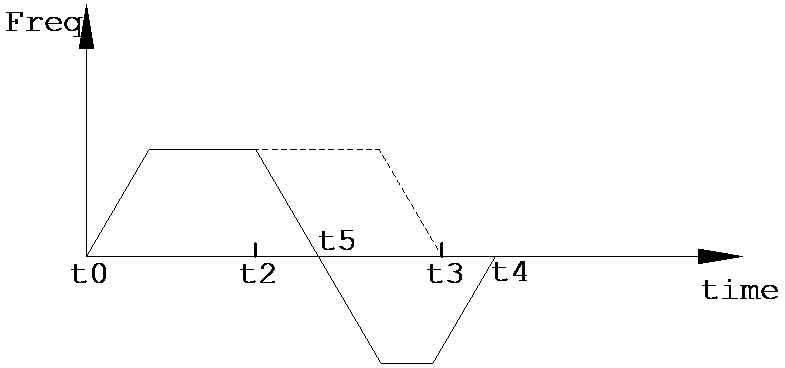
图7 reverse position adjustment speed curve
| register | pulse port |
|---|---|
| M8134 | Y000 |
| M8135 | Y001 |
| M8136 | Y002 |
| M8137 | Y003 |
| register | pulse port |
|---|---|
| M8138 | Y004 |
| M8139 | Y005 |
| M8140 | Y006 |
| M8141 | Y007 |
| M8142 | Y010 |
| M8143 | Y011 |
| register | pulse port |
|---|---|
| D8140(D8141) | Y000 |
| D8142(D8143) | Y001 |
| D8144(D8145) | Y002 |
| D8146(D8147) | Y003 |
| register | pulse port |
|---|---|
| D8148(D8149) | Y004 |
| D8150(D8151) | Y005 |
| D8152(D8153) | Y006 |
| D8154(D8155) | Y007 |
| D8156(D8157) | Y010 |
| D8158(D8159) | Y011 |
| register | pulse port |
|---|---|
| M8118 | Y000 |
| M8119 | Y001 |
| M8120 | Y002 |
| M8121 | Y003 |
| register | pulse port |
|---|---|
| M8122 | Y004 |
| M8123 | Y005 |
| M8124 | Y006 |
| M8125 | Y007 |
| M8126 | Y010 |
| M8127 | Y011 |
1.2.1. Attention:#
For high-speed pulse output, it is designed for external high-speed devices. To count the pulses, only the high-speed pulse input counter can be used, and internal counters or Y edge changes cannot be used for counting. When used as a high-speed output, it cannot be used as a regular output port;
The OFF time of transistors has the characteristic of being prolonged under light loads. So, when responsiveness is required, please design a load resistor to increase the load current when the load is lighter;
For the pulse output Y0, the number of pulses is accumulated in register D8140 (D8141), where D8141 stores the high 16 bits and D8140 stores the low 16 bits;
The pulse accumulation count registers (D8140~D8158) are important registers that can be read and written. When a new value is written, the count will be added or subtracted based on the new value;
Due to the directional output of the pulse in this instruction, the pulse accumulation counting registers (D8140~D8158) count according to the direction;
When outputting high-speed pulses, the values in the pulse accumulation count registers (D8140~D8158) are discontinuous and constantly changing. When used for judgment, please use size comparison instead of equal judgment;
When the pulse command is used to output port Y, the Y port cannot be used for other purposes, that is, ordinary commands cannot perform ON or OFF operations on the Y port anymore;
Be careful to avoid out of bounds situations, for example, if the current position is \ -100 and the DRVA command is sent to 2147483600, and the total length exceeds the upper limit of 32-bit positive integers, the target position will be incorrectly identified as \ -2147483594.
Instructions for using EDRVI/EDRVA disabled deceleration stop soft limit bottom layer (first install customized version upper layer)
Only EDRVI/EDRVA instructions are valid;
Occupy special register M8202, please do not use it for other functions in the project;
By default, M8202 is set to 0, and disabling EDRVI/EDRVA will cause the pulse being sent to stop abruptly; Setting M8202 to 1 can enable the disabled deceleration stop function. In this mode, the disabled will decelerate and stop at the original deceleration time. If it has entered the deceleration stage, it will continue to decelerate and stop without crossing the original endpoint;
If the same command is reactivated during the deceleration stop phase, the deceleration will also remain in a stopped state after completion; If another pulse command from the same pulse port is enabled during the deceleration stop phase, the next pulse command will be executed after the deceleration stop;
At the same time, a new mode is provided for PLSSTOP: when the stop mode is written as 2, PLSSTOP will decelerate and stop at the original deceleration time. If PLSSTOP is triggered during the deceleration phase of the original command, it will continue the original deceleration process to ensure that it does not cross the set endpoint (only single-stage commands with acceleration and deceleration are valid). The response during the deceleration phase is the same as 4.
1.3. The valid operands of the instruction#
1.3.1. Real time relative position adjustment instruction(EDRVI)#
| Input/Output | Data Type | operand | Description |
|---|---|---|---|
| F | 32-bit integer | D/CV/K/H/FD, bit composite word (X/Y/M/C/T/S), local variable (LD) | frequency |
| P | 32-bit integer | D/CV/K/H/FD, bit composite word (X/Y/M/C/T/S), local variable (LD) | quantity |
| AC | 16 bit unsigned integer | D/CV/TV/AI/AO/K/H/V/Z/FD, bit composite word (X/Y/M/C/T/S), local variable (LW) | acceleration time |
| DC | 16 bit unsigned integer | D/CV/TV/AI/AO/K/H/V/Z/FD, bit composite word (X/Y/M/C/T/S), local variable (LW) | deceleration time |
| OUT | ON/OFF | Y | Pulse |
| DIR | ON/OFF | Y | Direction |
1.3.2. Absolute position real-time adjustment instruction(EDRVA)#
| Input/Output | Data Type | operand | Description |
|---|---|---|---|
| F | 32-bit integer | D/CV/K/H/FD, bit composite word (X/Y/M/C/T/S), local variable (LD) | frequency |
| P | 32-bit integer | D/CV/K/H/FD, bit composite word (X/Y/M/C/T/S), local variable (LD) | quantity |
| AC | 16 bit unsigned integer | D/CV/TV/AI/AO/K/H/V/Z/FD, bit composite word (X/Y/M/C/T/S), local variable (LW) | acceleration time |
| DC | 16 bit unsigned integer | D/CV/TV/AI/AO/K/H/V/Z/FD, bit composite word (X/Y/M/C/T/S), local variable (LW) | deceleration time |
| OUT | ON/OFF | Y | Pulse |
| DIR | ON/OFF | Y | Direction |
1.4. Example#
Command table:_
NETWORK 000
LDP M8151
MOVD K100000 D0//Pulse output D0D1
MOVD K50000 D2//Pulse output frequency D2D3
MOV K100 D4//Acceleration time 100ms D4
MOV K200 D5//Deceleration time 200ms D5
NETWORK 001
LD M0
EDRVI D0 D2 D4 D5 Y1 Y6//When M0 is set, EDRVI starts working
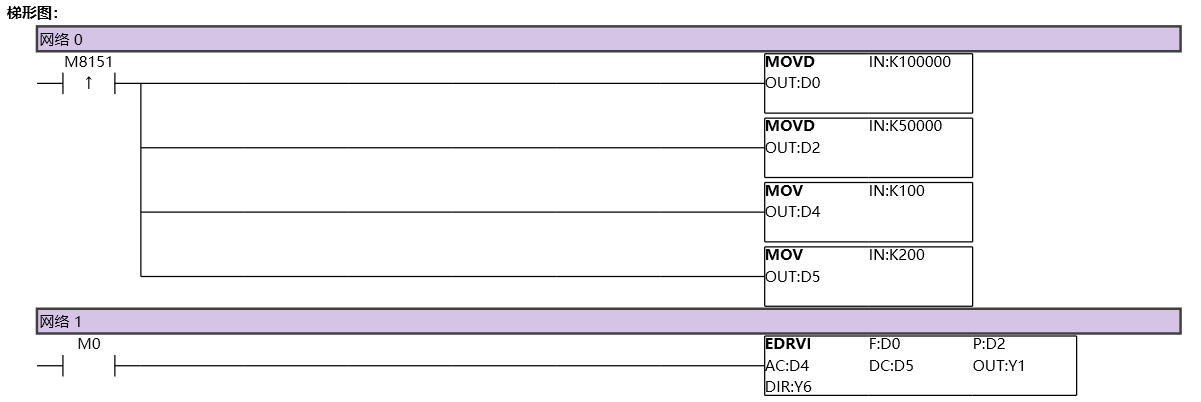
图8 EDRVI11
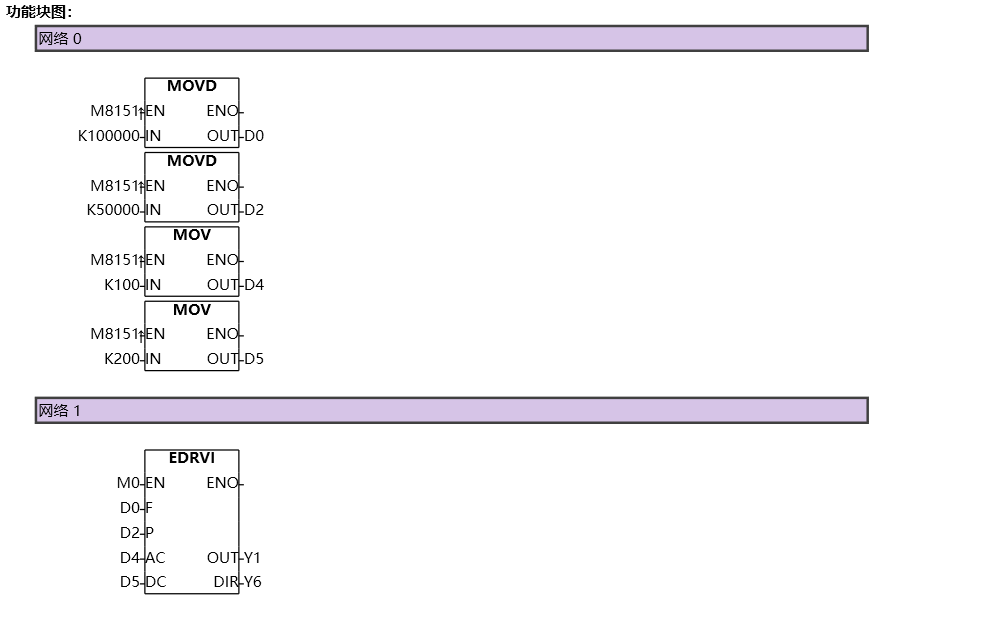
图9 EDRVI12
อ่านเพิ่มเติม
- คำสั่งควบคุม Servo Motor ด้วย PLC-Samkoon | EDRVI และ EDRVAเรียนรู้การควบคุม Servo Motor ด้วย PLC-Samkoon ผ่านคำสั่ง EDRVI (Incremental) และ EDRVA (Absolute) พร้อมเทคนิคการปรับพารามิเตอร์ระหว่างการทำงาน
- คำสั่ง PLSF ควบคุม Servo Motor PLC - การหมุนต่อเนื่องเรียนรู้คำสั่ง PLSF ใน PLC สำหรับควบคุม Servo Motor แบบหมุนต่อเนื่อง ปรับความเร็ว Real-time พร้อมตัวอย่างโปรแกรม วิธีตั้งค่า และเทคนิคการแก้ปัญหา

