


1. Linear interpolation LINEI/LINEF
ในหน้านี้7 หัวข้อ
| Corresponding Command | Annotation/Description | Parameters |
|---|---|---|
| LINEI/LINEF | Linear interpolation instruction | Plane system number |
| Line type | ||
| X-axis endpoint coordinates (K/D) | ||
| Y-axis endpoint coordinates (K/D) | ||
| Relative/Absolute Coordinates | ||
| Acceleration time (K/D) | ||
| Deceleration time (K/D) | ||
| Speed (K/D) |
1.1. Instruction description#
The PLC high-speed pulse output port is Y0~Y1 or Y0~Y3, with a pulse frequency range of 0~200KHz;
LINEI/LINEF are integer parameter instructions and floating-point parameter instructions, respectively, corresponding to pulse pls and millimeter mm units;
The function of this instruction is to run a straight line from the current position to the endpoint position in a specified plane system;
It is legal for the running length and acceleration/deceleration time to satisfy the following relationship (in practical applications, try to satisfy this relationship as much as possible, otherwise the program will automatically adjust):
0.5 * (acceleration time+deceleration time) * speed<=straight line length
When the parameters set by the user are very unreasonable, the interpolation instruction will stop pulse output when an error is detected and provide an error code in the D8176 register. The user can troubleshoot the error based on the error code. When the parameters set by the user are adjustable and unreasonable, the program will automatically correct the parameters.
If the speed entered by the user is negative, its absolute value will be taken as the valid value.
1.1.1. Instruction usage instructions:#
First, select the plane number. For plane settings, please refer to "Plane System Settings". If the plane system is not enabled, it will not function properly;
Choose the unit for the parameter of this instruction, which can be millimeters (mm) or pulses (pls), corresponding to the commands LINEF and LINEI, respectively. It is recommended that users use millimeters as the unit for the parameter, which is practical and does not require conversion, making it less prone to errors;
The X-axis endpoint coordinates and Y-axis endpoint coordinates are the endpoint positions of a straight line, which can be input as K/D type parameters. When using the D register to input parameters, the endpoint coordinates are assigned to the D register using the MOVD or MOVF instruction, depending on whether the interpolation instruction is LINEI or LINEF type;
Relative/absolute coordinates. If selected as relative coordinates, the endpoint coordinates set will be the offset based on the current point. If it is an absolute coordinate, the endpoint coordinate represents the absolute position relative to the origin, as shown in the relative/absolute diagram;
Acceleration time and deceleration time can be directly set as a constant K or as a D register. When initializing the instruction, the value in the D register is read once as the acceleration/deceleration time. The acceleration/deceleration time can only be assigned using MOV, which is a 16 bit integer in milliseconds. Due to the interpolation cycle of the algorithm, if the acceleration and deceleration time is too short and the pulse frequency jumps too much, it cannot achieve the acceleration and deceleration effect. Interpolation acceleration and deceleration are asymmetric S-shaped acceleration and deceleration, and the acceleration and deceleration segments are controlled by the duration of acceleration and deceleration, as shown in the asymmetric S-shaped acceleration and deceleration diagram.
The speed represents the composite speed of XY axis, and the speed parameter can be set as K or D. If it is set as a constant K, the linear speed cannot be adjusted. If it is set as D register, when the value of D register changes, the speed will also change accordingly, which can realize real-time speed regulation. During acceleration and deceleration, adjust the speed parameter, and the speed change will be adjusted immediately after the acceleration and deceleration. However, it should be noted that whether to use MOVD or MOVF to assign speed to the D register depends on whether the interpolation instruction type is LINEI or LINEF. When the unit is set to pulse pls, the speed unit is pls/s, and MOVD is used to assign the speed. Conversely, MOVF is used. If the X-axis and Y-axis pulse equivalents set by the planar system are not equal, the true velocity is calculated based on the X-axis pulse equivalent by default. When the acceleration, deceleration, and speed parameters do not meet the above legal relationship, the system will automatically reduce the speed parameters to make them legal. The adjustment method refers to the illegal S-shaped adjustment chart.
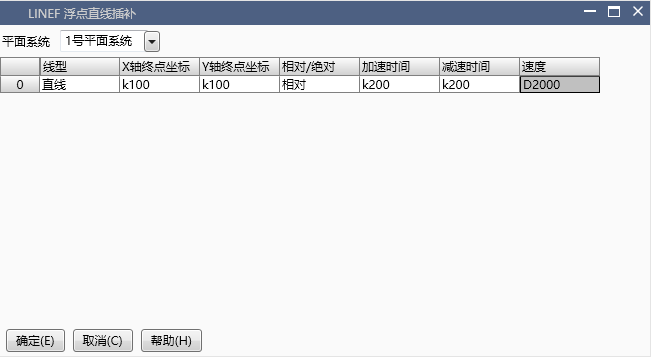
图1 LINE command image
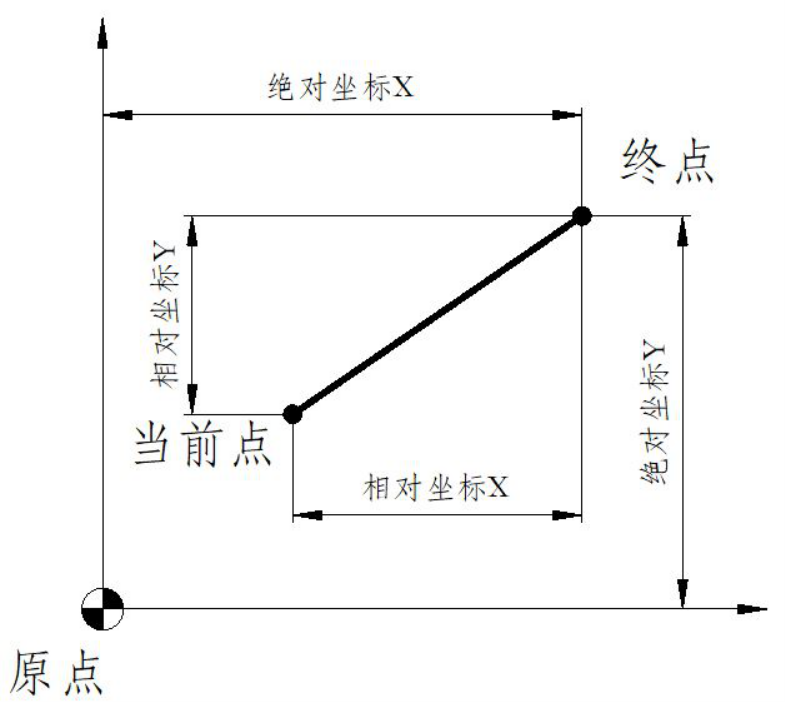
图2 Relative/Absolute Diagram
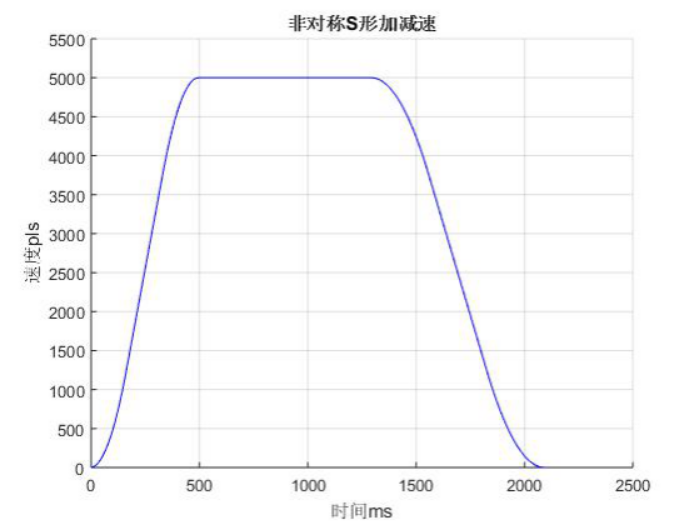
图3 Asymmetric S-shaped acceleration and deceleration diagram
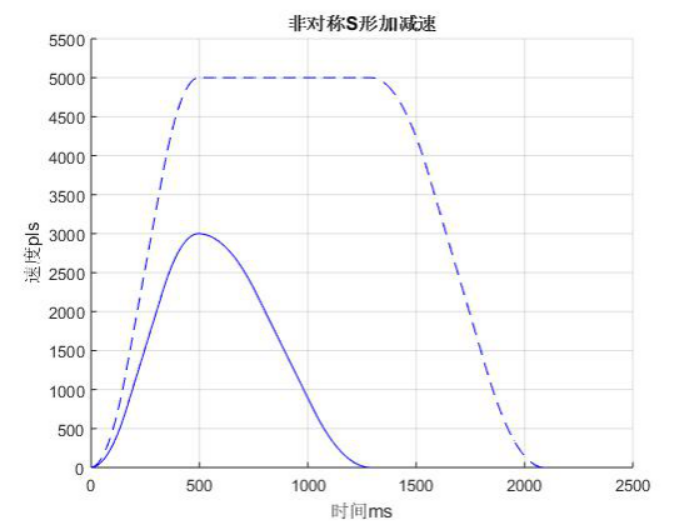
图4 Illegal S-shaped adjustment chart
| register | Pulse port |
|---|---|
| M8134 | Y000 |
| M8135 | Y001 |
| M8136 | Y002 |
| M8137 | Y003 |
| register | Pulse port |
|---|---|
| M8138 | Y004 |
| M8139 | Y005 |
| M8140 | Y006 |
| M8141 | Y007 |
| M8142 | Y010 |
| M8143 | Y011 |
| register | Pulse port |
|---|---|
| M8144 | Y000 |
| M8145 | Y001 |
| M8146 | Y002 |
| M8147 | Y003 |
| register | Pulse port |
|---|---|
| D8140(D8141) | Y000 |
| D8142(D8143) | Y001 |
| D8144(D8145) | Y002 |
| D8146(D8147) | Y003 |
| register | Pulse port |
|---|---|
| D8148(D8149) | Y004 |
| D8150(D8151) | Y005 |
| D8152(D8153) | Y006 |
| D8154(D8155) | Y007 |
| D8156(D8157) | Y010 |
| D8158(D8159) | Y011 |
1.1.2. Attention:#
For high-speed pulse output, it is designed for external high-speed devices. To count the pulses, only the high-speed pulse input counter can be used, and internal counters or Y edge changes cannot be used for counting. When used as a high-speed output, it cannot be used as a regular output port;
The OFF time of transistors has the characteristic of being prolonged under light loads. So, when responsiveness is required, please design a load resistor to increase the load current when the load is lighter;
The pulse accumulation count registers (D8140~D8158) are important registers that can be read and written. When a new value is written, the count will be added or subtracted based on the new value;
Due to the directional output of the pulse in this instruction, the pulse accumulation count registers (D8140~D8158) count according to the direction;
When outputting high-speed pulses, the values in the pulse accumulation count registers (D8140~D8158) are discontinuous and constantly changing. When used for judgment, please use size comparison instead of equal judgment;
Do not set the acceleration and deceleration time too small, otherwise there will be no acceleration and deceleration effect;
When the unit is set to pulse pls, the speed unit is pls/s. If the X-axis and Y-axis pulse equivalents set by the planar system are not equal, the true speed is calculated by default based on the X-axis pulse equivalent;
The pulse is sending a flag, for example, M8134 only represents whether Y0 is outputting a pulse. If it is necessary to detect whether a straight line is running, the sending flag of both axes needs to be connected in parallel, as shown in the example;
The target point coordinates should not coincide with the current point coordinates;
When the pulse command is used to output port Y, the Y port cannot be used for other purposes, that is, ordinary commands cannot perform ON or OFF operations on the Y port anymore.
If the frequency of multiple pulse pulses exceeds 200K, a pull-up resistor needs to be added to the pulse output port to ensure that the pulse waveform is not distorted. The pull-up voltage is 24V, and the recommended pull-up resistor is 1K.
1.2. The valid operands of the instruction#
1.2.1. integer command(LINEI)#
| Input/Output | Data Type | operand | Description |
|---|---|---|---|
| ID | 16 bit unsigned integer | K/H | Number |
1.2.2. Float command(LINEF)#
| Input/Output | Data Type | operand | Description |
|---|---|---|---|
| ID | 16 bit unsigned integer | K/H | Number |
1.3. Example#
From the current position, move to the endpoint where the X and Y axes are offset by 100mm in all positive directions. Set M500 at the beginning of the "linear motion" and reset M500 after the end. Set the X-axis to Y0 and Y-axis to Y1 for the planar system. The straight line parameter setting is shown in the "LINE command diagram", and the program is as follows.
command table:
NETWORK 000
LD M40
MPS
MEP
MOVF K20 D2000
MPP
LINEI K1
NETWORK 001
LD M8144
MPS
MEP
SET M500 K1
MPP
MEF
RST M500 K1
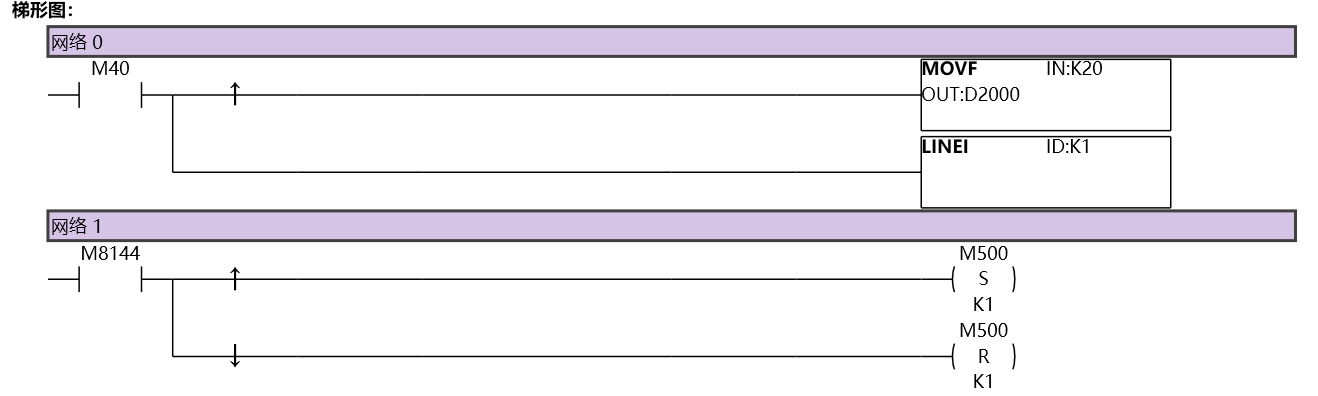
图5 LINEI11
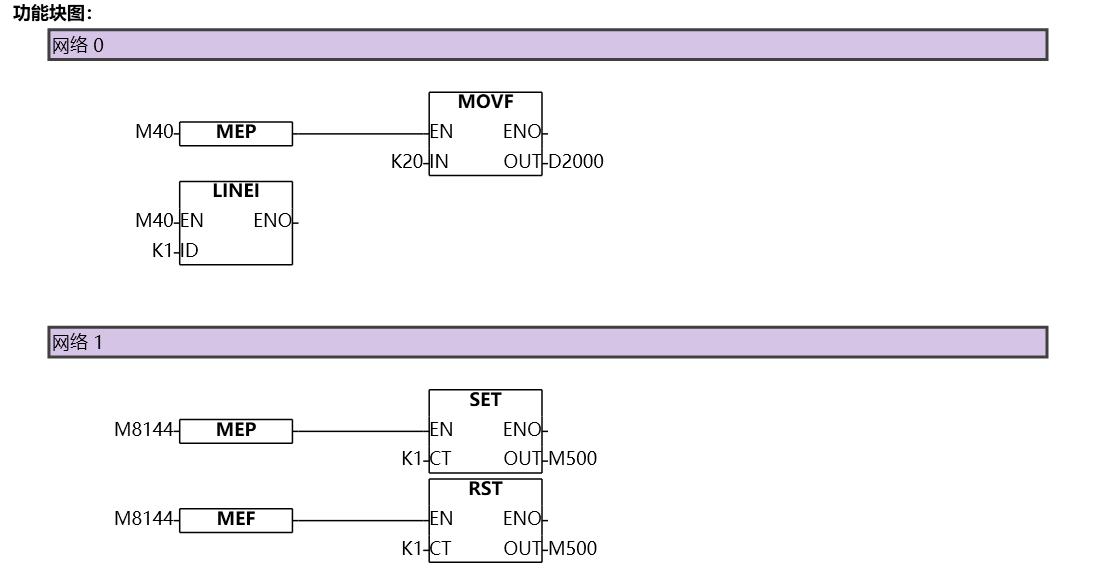
图6 LINEI12
อ่านเพิ่มเติม
- คำสั่งควบคุม Servo Motor ด้วย PLC-Samkoon | EDRVI และ EDRVAเรียนรู้การควบคุม Servo Motor ด้วย PLC-Samkoon ผ่านคำสั่ง EDRVI (Incremental) และ EDRVA (Absolute) พร้อมเทคนิคการปรับพารามิเตอร์ระหว่างการทำงาน
- คำสั่ง PLSF ควบคุม Servo Motor PLC - การหมุนต่อเนื่องเรียนรู้คำสั่ง PLSF ใน PLC สำหรับควบคุม Servo Motor แบบหมุนต่อเนื่อง ปรับความเร็ว Real-time พร้อมตัวอย่างโปรแกรม วิธีตั้งค่า และเทคนิคการแก้ปัญหา

