


1. Pulse stop PLSSTOP
1.1. Instruction Description#
When the input terminal changes from OFF to ON, the Yn pulse port performs the corresponding stop action according to the set stop mode. When the stop mode is set to K0, the pulse output is immediately stopped, and the stop time parameter is invalid. When the stop mode is set to K1, it is a deceleration stop, and the deceleration time is the setting parameter for the stop time.
The PLSSTOP instruction for pulse stop is triggered by the rising edge.
It is not recommended to use it for interpolation instructions and follower instructions (FOLLOW/ECAM).
If the original command in operation is disconnected during the deceleration stop period, an emergency stop will be made directly because PLSSTOP does not occupy the port, and the original command is still occupied during the deceleration stop period, rendering it ineffective.
1.2. The valid operands of the instruction#
| Input/Output | Data Type | operand | Description |
|---|---|---|---|
| OUT | ON/OFF | Y | Pulse |
| MODE | 16 bit integer | K/H | Mode |
| TIME | 16 bit integer | D/CV/TV/AI/AO/K/H/V/Z/FD, bit composite word (X/Y/M/C/T/S), local variable (LW) | time |
1.3. Example#
Command table:
NETWORK 000
LDP M11//M11 rising edge trigger
PLSSTOP Y000 K1 K100//Y000 pulse deceleration stop, deceleration time is 100ms
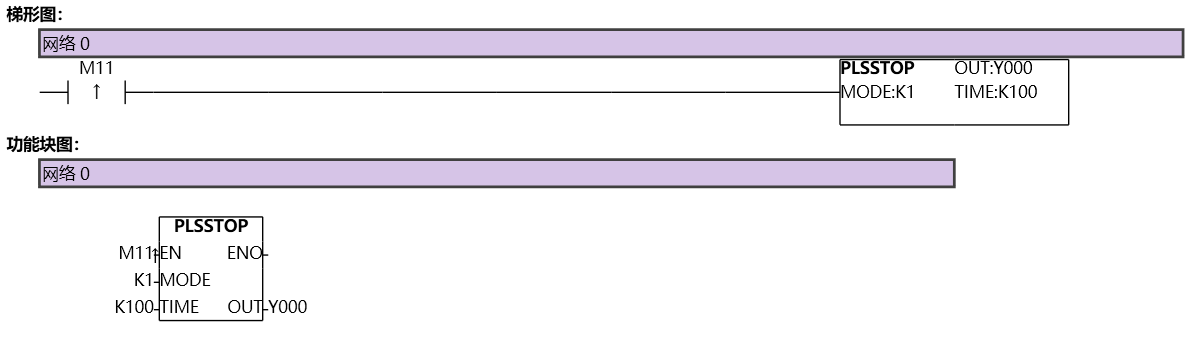
图1 PLSSTOP
อ่านเพิ่มเติม
- คำสั่งควบคุม Servo Motor ด้วย PLC-Samkoon | EDRVI และ EDRVAเรียนรู้การควบคุม Servo Motor ด้วย PLC-Samkoon ผ่านคำสั่ง EDRVI (Incremental) และ EDRVA (Absolute) พร้อมเทคนิคการปรับพารามิเตอร์ระหว่างการทำงาน
- คำสั่ง PLSF ควบคุม Servo Motor PLC - การหมุนต่อเนื่องเรียนรู้คำสั่ง PLSF ใน PLC สำหรับควบคุม Servo Motor แบบหมุนต่อเนื่อง ปรับความเร็ว Real-time พร้อมตัวอย่างโปรแกรม วิธีตั้งค่า และเทคนิคการแก้ปัญหา

